

If you’re new to playing Valorant or just heard of it, it is Riot Games’ most popular tactical shooter that has been popularized worldwide. As updates are being sent every Act and patches are done every other week, Valorant is becoming heavier as time goes by. If you’re looking for the best Valorant gaming experience, this guide will help you optimize your system to match Valorant’s system requirements for 2024.
To start with, Valorant is not that reliant on the GPU. Instead, the CPU handles the majority of the game logic, algorithms, and more. However, the GPU still contributes largely to the overall gaming experience. As it handles graphics, including textures, shadows, and visual effects.
Major Specs to Consider
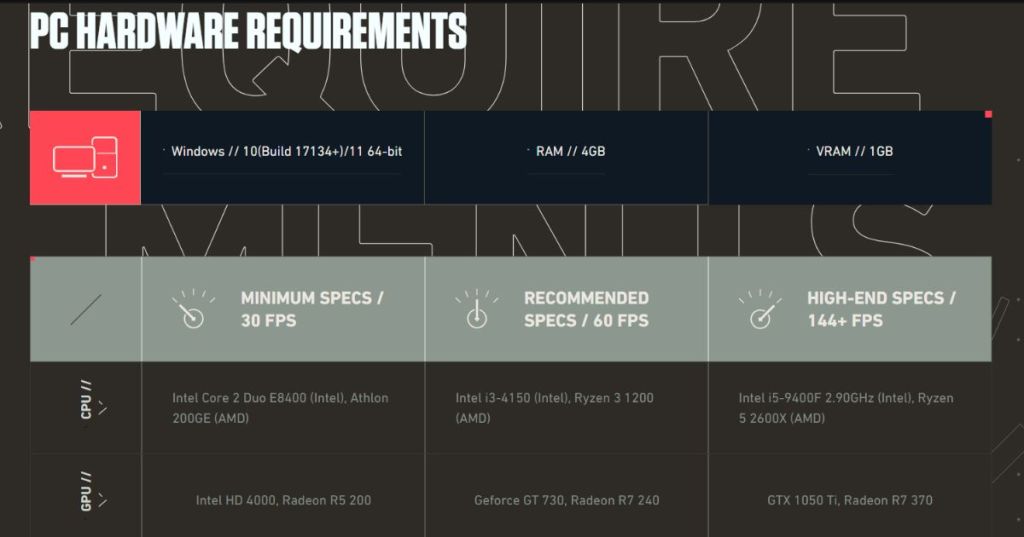
- CPU: First, having a multi-core processor with high clock speed and more cores is important to optimize Valorant’s performance. Have you heard of the word, clock speed? It is the rate at which your CPU executes instructions from any app. And cores if we look at it, for example, are the number of people, working for the instructions given.
- GPU: As mentioned earlier, Valorant is not much of a GPU-intensive game. However, having a dedicated graphics card can significantly improve your overall experience. A GPU with at least 2GB of VRAM is enough to achieve optimal performance.
- RAM: A RAM with a higher clock speed is also good. But a standard 8GB of RAM is enough to handle Valorant. But, a good way to reserve your RAM is to avoid using other apps while playing the game. More RAM means better multitasking and can reduce stuttering while playing the game.
- Storage: For faster load times and an overall improved system responsiveness, using an SSD is better. Compared to HDDs, SSDs are using flash memory cells for faster response times. While, HDDs use a mechanical arm to read and write data.
- Monitor: The hype for the highest monitor refresh rate is a never-ending topic. While it is not a system requirement per se, a high refresh rate monitor like 144hz, can enhance your overall Valorant experience. Especially if your system can push higher refresh rates. More frames, mean more kills? Not really. But if you’re competitive, then it can be.
Low, Medium, and High System Configurations

If your budget is a bit low, or you have a more flexible budget, don’t worry. As we got you covered with different system configurations on which you can base your current or future systems.
Low-End System
- CPU: AMD Athlon 200GE
- GPU: AMD Radeon R5 240
- RAM: 8GB DDR4
- Storage: 256GB HDD
- Expected Performance: 60 FPS at 1080p with low settings
Medium System
- CPU: Intel Core i5-10400F
- GPU: NVIDIA GeForce GTX 1650 Super
- RAM: 16GB DDR4
- Storage: 512GB SSD
- Expected Performance: 144+ FPS at 1080p with medium to high settings
High-End System
- CPU: AMD Ryzen 7 5800X
- GPU: NVIDIA GeForce RTX 3070
- RAM: 32GB DDR4
- Storage: 1TB NVMe SSD
- Expected Performance: 240+ FPS at 1440p with high to ultra settings
Optimizing Valorant Performance

Having a low-, medium, or high-end system should not stop you from trying these tips to optimize Valorant.
- Update your graphics driver regularly. Try to use the built-in graphics software to update your drivers to the latest versions.
- Close unnecessary background apps that is running.
- Adjust the in-game video settings to get the best balance between visuals and performance.
- Have proper cooling for your device to prevent thermal throttling.

 Sakoosha
Leave a comment